
Best overall format: a folding convertible such as the Lenovo Yoga 7 2-in-1. Best for tablet-first use: Microsoft Surface Pro. For 2026, choose 2-in-1 laptops around how you type, read and watch—not just the touchscreen. Thestoretosee helps everyday shoppers make practical tech choices.
- For 2-in-1 laptops, Lenovo Yoga 7 2-in-1 suits shoppers who want an attached keyboard and folding touchscreen.
- Microsoft Surface Pro suits tablet-first shoppers who also need Windows applications; check the keyboard bundle.
- G140L is an Android keyboard-tablet alternative, not a Windows laptop replacement.
- Choose the operating system your apps need before comparing screens or accessories.
Why this matters
A touchscreen alone does not make a laptop a useful tablet. A folding convertible keeps its keyboard attached; a detachable lets you remove it.
Buy for the mode you will use most. If you mainly type at a kitchen table or on the sofa, start with a laptop-style convertible. If you mainly read, browse and hold the screen, start with a detachable.
What makes the best 2-in-1 laptops
Use this short checklist for your 2026 shortlist:
- Everyday apps: Check that your banking, work, printing and video-call apps support the operating system.
- Keyboard design: Choose an attached keyboard for frequent typing or a detachable keyboard for handheld use.
- Comfort: Compare the complete device weight, including the keyboard—not just the tablet.
- Screen handling: Look for a size you can comfortably hold as well as read.
- Included accessories: Confirm the keyboard, charger and pen individually. A pictured accessory is not proof it is included.
- Connections: Check the ports needed for your monitor, storage drive or other accessories.
Best options at a glance
These choices serve different routines. The Android option is included as an alternative, not as an equivalent Windows laptop.
| Option | Best for | Standout feature | Key limitation |
|---|---|---|---|
| Lenovo Yoga 7 2-in-1 | Laptop-first everyday use | Folding screen with an attached keyboard | The keyboard stays attached in tablet mode |
| Microsoft Surface Pro | Tablet-first use with Windows apps | Detachable-keyboard design | Check keyboard inclusion and kickstand comfort |
| G140L keyboard tablet | Android browsing, email and entertainment | Keyboard-tablet bundle | Android does not run Windows desktop programs |
Configurations differ within product families. Match the exact listing to your needs rather than buying on the family name alone.
1. Lenovo Yoga 7 2-in-1: best for laptop-first use
The Lenovo Yoga 7 2-in-1 is a Windows convertible with a screen that folds back through 360 degrees. You keep a conventional laptop layout for typing, then fold the keyboard behind the display for touch use.
Best for: Everyday shoppers who type regularly and want occasional tablet or stand-style use.
Lenovo Yoga 7 2-in-1 pros:
- The keyboard remains attached when you change modes.
- The laptop layout suits email, documents and household admin.
- The folding design gives you another way to position the screen for watching videos.
Lenovo Yoga 7 2-in-1 cons:
- You still hold the keyboard section in tablet mode.
- The family name alone does not identify the screen, memory or processor configuration.
For a 2026 purchase, compare the exact version and its complete weight. Do not assume every Yoga-branded laptop has the same folding design.
Verdict: Buy the Lenovo Yoga 7 2-in-1 format if typing comes first and handheld use comes second.
2. Microsoft Surface Pro: best for tablet-first Windows use
Microsoft Surface Pro uses a tablet body with a kickstand and a detachable-keyboard design. That makes it a different choice from a folding laptop: remove the keyboard when you want to hold the screen.
Best for: Shoppers who want tablet handling but still need Windows applications.
Microsoft Surface Pro pros:
- The keyboard can detach for reading and touch use.
- The kickstand supports the screen on a table.
- Windows gives you a desktop operating system rather than Android.
Microsoft Surface Pro cons:
- A kickstand-and-keyboard setup feels different from a hinged laptop on your lap.
- Keyboard inclusion depends on the bundle.
- Application compatibility needs checking against the exact model and processor.
For your 2026 shortlist, check essential applications before choosing a configuration. A familiar Windows name does not replace an app compatibility check.
Verdict: Buy Microsoft Surface Pro if you want to remove the keyboard often; skip this format if lap typing is your priority.
3. G140L keyboard tablet: best as an Android alternative
The G140L listing describes an Android tablet with a keyboard bundle and a 14.1-inch display. Treat it as a tablet with typing accessories, not as proof that you can replace a Windows laptop.
Best for: Shoppers whose routine centers on Android apps, websites, email and entertainment.
G140L keyboard tablet pros:
- The listing identifies a keyboard bundle.
- Android supports a touch-first way of using apps.
- The listed screen size gives you a concrete dimension to compare before buying.
G140L keyboard tablet cons:
- Android does not run Windows desktop programs.
- A keyboard does not give Android apps the same features as their desktop equivalents.
- A larger display needs careful consideration if you mainly want a handheld reading device.
Thestoretosee shoppers comparing 2-in-1 laptops should keep this distinction clear: an Android keyboard tablet is an alternative device category, not the same purchase. Check the selected bundle and your essential apps before ordering.
Verdict: Consider the G140L for Android-first use; skip it if you need Windows desktop software.
Choose the design before the specification list
Your daily routine provides a simpler starting point than a long feature list:
- Attached keyboard: Choose this when typing is the main job.
- Detachable keyboard: Choose this when holding the screen matters most.
- Android alternative: Choose this only when your apps and websites cover your routine.
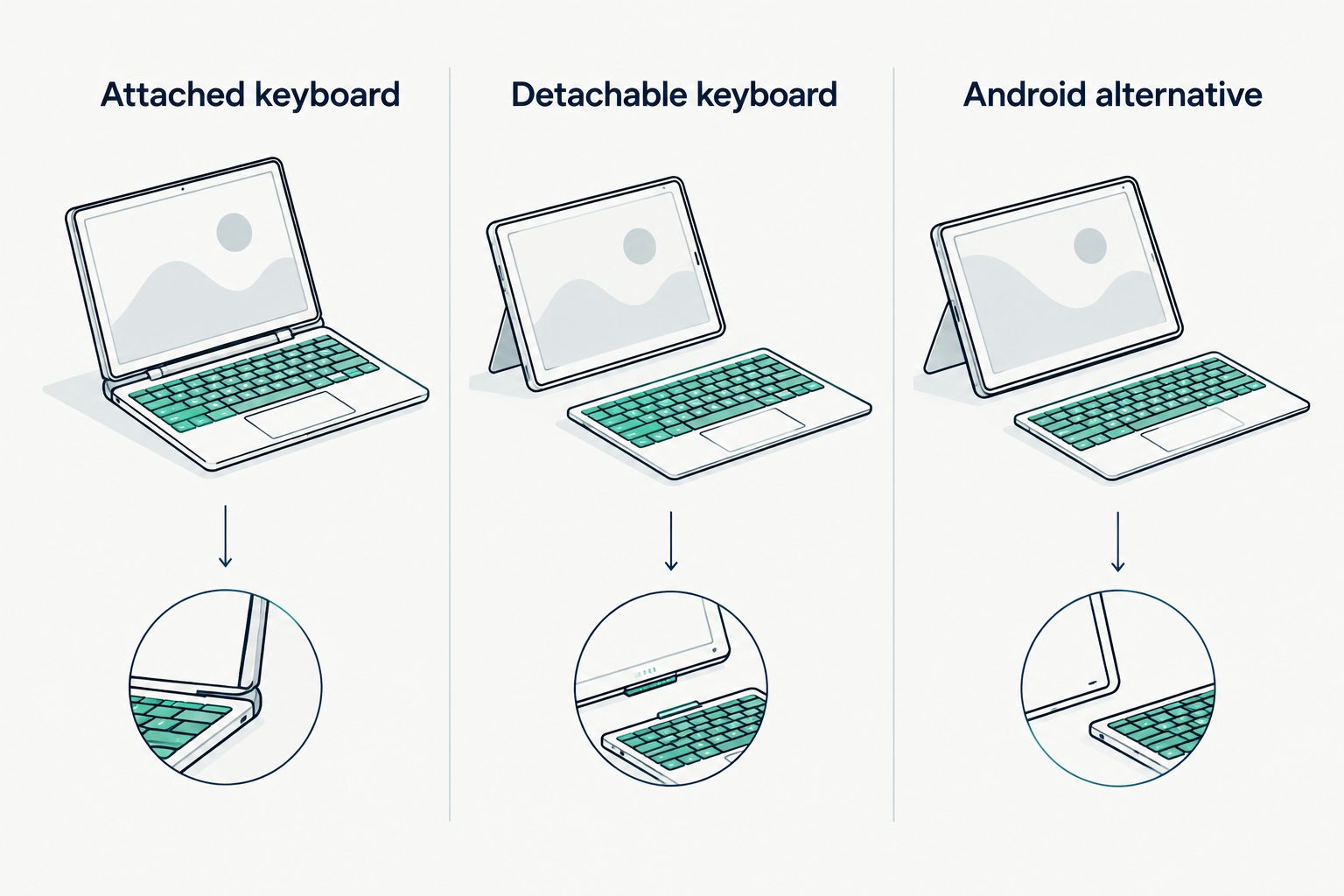
Before buying, picture your usual setup. A table, a sofa and a handheld reading session ask different things of the same device.
How the choices are ranked
The order prioritizes everyday typing first, removable-keyboard use second and an Android alternative third. It compares design and operating-system trade-offs—not measured speed, battery life or value claims.
For Thestoretosee, practical 2-in-1 laptops advice starts with fit: choose the device that handles your actual tasks without asking you to change your routine.
Which 2-in-1 should you choose?
Start with a folding Windows convertible if you are undecided. It keeps the familiar laptop layout while adding touch and folding modes.
Choose Microsoft Surface Pro instead when removing the keyboard is a regular need. Choose an Android keyboard tablet only after confirming that you do not depend on Windows programs.
For 2026, the useful question is not whether a device does two things. It is whether both modes solve something you actually do.
FAQ
What's the best type of 2-in-1 laptop for everyday use?
A folding convertible is the best starting point when everyday use involves frequent typing. Lenovo Yoga 7 2-in-1 keeps its keyboard attached while allowing the screen to fold back.
Is Microsoft Surface Pro better than a folding laptop?
Microsoft Surface Pro is a better fit when removing the keyboard matters more than a conventional laptop layout. A folding laptop is the simpler choice when typing is your main activity.
Can an Android tablet with a keyboard replace my laptop?
An Android keyboard tablet can replace your laptop only when your essential tasks work in Android apps or a browser. It does not run Windows desktop programs.
Does a touchscreen mean a laptop is a 2-in-1?
No, a touchscreen alone does not make a laptop a convertible or detachable. Check whether the screen folds into tablet mode or separates from the keyboard.
Do 2-in-1 laptops include a keyboard and pen?
Accessory inclusion depends on the device and selected bundle. Check the written contents for the keyboard, pen and charger rather than relying on photographs.
What should I check before buying a 2-in-1 in 2026?
Check your essential apps, keyboard design, complete weight, ports and included accessories. Then confirm the exact configuration rather than relying on the product-family name.
One last thing
Check where you will put the keyboard when you switch modes. A folding keyboard stays with the device; a detachable keyboard needs somewhere to go. That small practical detail can settle the choice faster than another specification comparison.
Thestoretosee's recommendation: choose for your normal day, not the occasional task you imagine doing.