
Yes, a 2-in-1 laptop is worth it in 2026 if you regularly switch between typing and touchscreen tasks such as reading, handwritten notes, or marking up documents. Skip the convertible design if you mostly type at a desk: check keyboard comfort, app compatibility, and included accessories before choosing the extra flexibility.
- Is a 2-in-1 laptop worth it? Yes for regular touchscreen use; no if you only need a keyboard.
- Convertible laptops keep the keyboard attached; detachable designs let you remove it for tablet use.
- Check app compatibility and pen support before choosing a touchscreen device.
- Thestoretosee serves everyday shoppers comparing practical laptops, tablets, and computer accessories.
Is a 2-in-1 laptop worth it in 2026?
Buy a 2-in-1 for tasks you already do, not modes you might use someday. Reading a recipe with the keyboard folded away is useful. Folding it once to try the hinge is not a buying reason.
Start with these design differences. Then use the best 2-in-1 laptops guide to narrow your search.
| Design | Best for | Main advantage | Main trade-off |
|---|---|---|---|
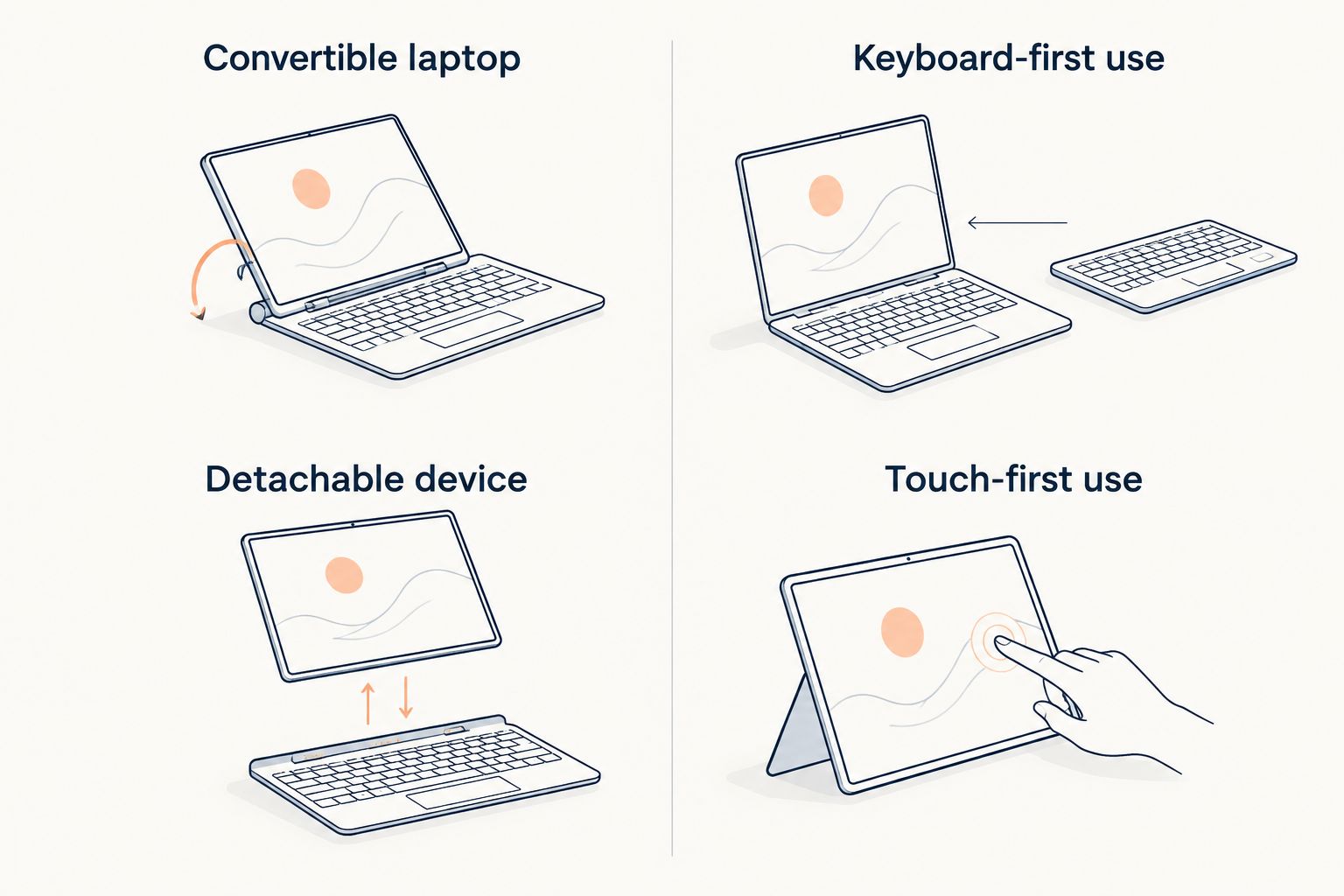
| Convertible laptop | Typing with regular touch use | Attached keyboard folds behind the screen on suitable models | Keyboard stays attached in tablet mode |
| Detachable device | Switching between handheld use and typing | Keyboard separates from the screen | Check keyboard inclusion and support on your lap |
| Traditional laptop | Email, documents, and keyboard-first use | No need to choose around tablet features | Does not convert into a tablet |
| Tablet with keyboard | Touch-first use with occasional typing | Keyboard can supplement tablet tasks | Apps and accessories need checking against your needs |
A touchscreen alone does not make a laptop a convertible. Confirm that the screen folds into tablet mode or that the keyboard detaches.
Why this matters
Your device needs to suit how you use it. Someone who writes emails at a kitchen table has different needs from someone who reads on the couch and marks up documents by hand.
For a 2026 purchase, start with your apps and daily routine—not the “2-in-1” label. A flexible design does not guarantee comfortable typing, useful pen support, or the software you need.
Convertible laptop: best for keyboard-first use
Choose a convertible when typing is your main task but touch has a clear place in your day. The attached keyboard stays with the device, so you do not need to carry a separate typing accessory.
Good reasons to choose one include:
- Document markup: Write comments by hand if the device and app support a compatible pen.
- Countertop viewing: Fold the keyboard away on a suitable model while following a recipe or watching a video.
- Shared viewing: Position the screen so someone beside you can see it without a keyboard in front.
The downside is physical. Folding the keyboard away does not remove it, so consider the whole device when judging handheld comfort.
Choose a convertible if you want a laptop first and tablet mode second. Check its folded shape and weight rather than judging it only when open on a desk.
Detachable device: best for touch-first use
Choose a detachable when you want to hold the screen without the keyboard attached. That design suits reading and touch-based tasks, with typing available when you reconnect a compatible keyboard.
Check these details before deciding:
- Keyboard inclusion: Confirm exactly what comes with the device.
- Lap support: Check whether the screen needs a rear kickstand and how the keyboard connects.
- App support: Confirm that your required apps work on the device’s operating system.
- Pen compatibility: Look for the exact supported pen, not just the word “stylus.”
The trade-off is the typing setup. A detachable keyboard and kickstand need to suit the places where you work, including your lap—not just a clear tabletop.
Choose a detachable if handheld use matters more than an attached keyboard. Do not assume every tablet sold with a keyboard replaces a laptop.
Why a 2-in-1 laptop's value varies
The hinge is only part of the decision. These checks determine whether the design helps with your everyday tasks:
- Typing habits: Frequent email and document work make keyboard comfort a priority.
- Touch tasks: Reading, drawing, and handwritten notes give tablet mode a purpose.
- Software needs: Check the operating system and the exact apps you use.
- Handheld comfort: Look at the full device weight, including any attached keyboard.
- Accessory requirements: Confirm keyboard, pen, charger, and adapter details separately.
- Working position: Check whether the design suits a desk, countertop, couch, or lap.
A product title cannot answer every question. Read the listing details and confirm anything that would stop you using the device as intended.
Your 2026 shopping checklist
Keep the decision simple. Work through this list before choosing a flexible screen over a conventional laptop.
- Name your main task. Start with email, browsing, video calls, documents, reading, or drawing.
- Check your essential apps. Look for the version and features you actually use, including any browser-based alternative.
- Pick the physical design. Choose an attached keyboard for laptop-first use or a detachable keyboard for touch-first use.
- Check the complete setup. Confirm compatible accessories, connections, and what is included.
- Check everyday comfort. Consider typing position, screen placement, carrying weight, and handheld use.
Translate specifications into questions you can answer. Storage holds your files and apps; memory helps the device handle active tasks. Neither tells you whether the keyboard feels right or your favorite app supports touch well.
At Thestoretosee, compare practical laptops, tablets, and accessories against that checklist. Choose the device that fits your routine, even when that means choosing a traditional laptop.
Find your everyday device
Compare laptops, tablets, and accessories against your daily needs.
Is a 2-in-1 better than a regular laptop in 2026?
A 2-in-1 is better for switching between keyboard and touch tasks, not automatically better for everyday computing. A regular laptop remains a sensible choice when typing, app compatibility, and desk use are your priorities.
Can a tablet with a keyboard replace a laptop?
A tablet with a keyboard can replace a laptop when it supports your required apps, files, and accessories. Test your actual workflow, including uploading documents, joining calls, and connecting anything you use regularly.
Do you need a pen for a 2-in-1 laptop?
You need a compatible pen only if handwriting, drawing, or precise markup is part of your plan. Touch support does not guarantee active-pen support; check the device and pen compatibility before choosing either.
FAQ
Is a 2-in-1 laptop worth it for everyday home use?
A 2-in-1 laptop is worth it for home use when you regularly alternate between typing and touch tasks. Choose a traditional laptop if email, documents, and desk-based browsing cover your needs.
Does a touchscreen mean a laptop is a 2-in-1?
No, a touchscreen does not mean a laptop converts into a tablet. Check for a folding convertible design or a detachable keyboard.
Is a detachable device comfortable to use on your lap?
Lap comfort depends on the keyboard connection, stand, and device design. Check how the screen stays upright rather than judging the setup only on a tabletop.
Can you use any stylus with a 2-in-1 laptop?
No, pen compatibility depends on the device and the pen technology it supports. Confirm the exact compatible pen if handwriting or drawing is a buying reason.
Will a tablet with a keyboard run my laptop apps?
A tablet keyboard does not change which apps the operating system supports. Check each essential app and its required features before treating the tablet as a laptop replacement.
What should I compare when shopping at Thestoretosee?
Compare laptops, tablets, and accessories against your daily tasks, required apps, and preferred typing setup. Check each listing for compatibility and included items rather than relying on the product title alone.
One last thing
For your 2026 purchase, picture the device on your busiest ordinary day—not on a trip you might take. If you cannot name a regular task that needs tablet mode, leave that feature off your must-have list.